Guide to Press Brake Controller Selection

Factory-sale Equipment
We have over 20 years in manufacturing. 
Press Brake
Laser Cutting Machine
Panel Bender
Hydraulic Shear
Get FREE Quote
Publish Date: November 14, 2025

I. Introduction

Frankly, most business owners, when purchasing a press brake, devote 90% of their attention to tonnage, throat depth, and machine rigidity—treating the controller as little more than a “bonus screen.” This is a costly misconception. The controller is not a passive user interface; it’s the driving force behind your factory’s profit margins, delivery speed, and growth potential. It captures the expertise of top operators and amplifies either efficient workflows or mediocre ones.

1.1 Beyond a Screen: How the Controller Defines Your Productivity Ceiling

Thinking of the controller merely as a tool for inputting angles and dimensions is like using a smartphone only to make calls—a massive waste of potential. A press brake with excellent mechanical performance but paired with a weak controller can have its overall equipment effectiveness (OEE) permanently capped at under 60%.

  • From “Single-Step Execution” to “Global Optimization”: Basic controllers require operators to manually enter parameters for each bend and determine the sequence by experience. Advanced controllers, however, can import DXF or 3D drawings, automatically compute the optimal bending sequence, recommend suitable tooling, and run 3D collision simulations in a virtual environment. This leap compresses hours of trial-and-error by a veteran into minutes of computer calculation.
  • The Precision–Repeatability–Speed “Iron Triangle”: Final bending accuracy stems from the controller’s millisecond-level closed-loop control over the hydraulic system, linear encoders, and servo motors. It precisely manages ram position (Y1/Y2 axes) and, via material database algorithms, predicts and compensates for springback. Top-tier controllers can integrate angle measurement systems, achieving true “first-piece pass” quality with angle tolerances consistently held within ±0.3°, a level of consistency unattainable through manual adjustments.
  • Case Warning: The Real Cost of Choosing the Wrong Controller – The Hidden Drain on Profits: One metal fabrication shop owner once celebrated saving ¥20,000 by opting for a cheaper controller. Six months later, he discovered that frequent small-batch orders meant each changeover and program setup took 30–50% longer than his competitors; night shift operators, with less experience, had triple the scrap rate of day shift; and complex parts were avoided altogether due to programming challenges. That initial ¥20,000 saving turned into over ¥100,000 in hidden losses within a year through wasted labor hours, material waste, and missed opportunities.

1.2 The Critical Divide: A Single Chart to Understand the True Difference Between NC and CNC

The fundamental distinction between NC (Numerical Control) and CNC (Computerized Numerical Control) isn’t about whether the screen uses buttons or touch—it’s about whether the “thinking” is done entirely by the operator or assisted by the machine.

DimensionNC (Numerical Control)CNC (Computerized Numerical Control)
Core LogicFaithful executor of instructionsAlgorithmic embodiment of experience
Programming MethodSingle-step manual parameter entry, relying on operator’s mental sequencing2D/3D graphical programming with offline import, system-optimized sequencing
Axis Control CapabilityBasic independent axis control, limited coordinationMulti-axis high-speed coordination, capable of complex synchronized actions
Precision AssuranceHeavily dependent on manual compensation and repeated trial bendsBuilt-in springback database and algorithms for automatic angle compensation
Ideal ApplicationSimple workpieces, large batches, fixed materials, high operator skill requirementsHigh-mix, small batches, complex shapes, frequent material changes, minimizing human dependency

Decision Self-Test: Does Your Business Need to Upgrade to CNC?

If you answer “yes” to any of the three questions below, investing in a CNC controller will likely deliver one of your fastest returns:

  1. Does your production model involve a high volume of “multi-variety, small-batch” orders, causing operators to frequently change tooling and set up new programs each day?
  2. Do your products include asymmetrical, tapered, or multi-step workpieces that require complex positioning by the backgauge?
  3. Do you aim to consistently maintain bending accuracy within ±0.5° and eliminate quality fluctuations caused by differences between shifts or operator skill levels?

1.3 Fast-Track to Axis Configuration: Understanding 2+1 to 8+1 Axes Through Lego Thinking

Forget the fear of axis configurations. Think of it like building with Lego: start with a basic kit, then add functional modules (axes) step-by-step depending on the complexity of the “creation” (workpiece) you want to make.

  • Core Axes (Basic Kit – Ensures the Machine Can “Work”)
    • Y1/Y2 Axes (Left and right hydraulic cylinders of the ram): These are the “legs” of the press brake. Independent control ensures absolute parallelism along the ram’s full length, forming the foundation for precise angles.
    • X Axis (Backgauge front–back movement): The “ruler” that defines bend length. Its positioning accuracy and speed directly impact workpiece dimensions and throughput.
    • R Axis (Backgauge up–down movement): Allows the backgauge fingers to raise or lower, easily handling stepped workpieces or avoiding formed edges during bending.
  • Advanced Axes (Expansion Pack – Solving Specific Challenges, Boosting Efficiency)
    • Z1/Z2 Axes (Backgauge left–right movement): Enable the two backgauge fingers to move independently left and right—ideal for processing asymmetrical parts or completing multiple setups in one clamping.
    • X-Prime / Delta-X Axis (Differential X movement): Allows slight front–back offset between the two backgauge fingers, enabling taper bending without special tooling.
    • Crowning Axis (Deflection compensation): Typically hydraulic or mechanical systems in the workbench that ensure consistent angles at the center and ends of long workpieces.

Visualizing Your Press Brake in Your Mind

Picture yourself standing at a press brake:

  • Directly above, the ram slowly descends—its precision guided by Y1 and Y2.
  • Beneath the workbench in front of you, a Crowning compensation axis quietly counters deformation.
  • Behind the machine, the agile backgauge system moves: front–back motion via the X axis, up–down via the R axis, independent left–right via Z1/Z2 axes, and even subtle front–back adjustment through the Delta-X axis.
ANATOMY OF A PRESS BRAKE

Once you grasp this “building block system,” you can look at your product drawings and clearly determine: “I only need a basic 4+1 axis (Y1/Y2, X, R + crowning) setup,” or “To efficiently produce complex enclosures, I must opt for a 6+1 axis configuration with Z1/Z2.” This is the first step in professional selection—driven by needs, not by stacking features.

II. Different Types of Press Brake Controllers

The control system of the press brake is divided into manual, NC, and CNC controllers in the metalworking industry.

Manual Controllers

Manual controllers are the simplest type of press brake control. They are often found on older or smaller machines and require the operator to make direct manual adjustments. The operator must manually set parameters such as the bend angle, back gauge position, and ram speed using levers and dials.

Benefits

  • Cost-Effective: Manual controllers are generally less expensive than automated systems, making them a good option for small shops or operations with limited budgets.
  • Simplicity: These controllers are easy to use and require minimal training, making them ideal for simple, low-volume bending tasks.

Drawbacks

  • Time-Consuming: Manual adjustments can be slow and labor-intensive, which reduces productivity.
  • Less Accurate: Manual settings are prone to human error, leading to inconsistencies and lower precision in the bending process.

NC (Numerical Control) Controllers

These controllers introduce a degree of automation by using electronic controls to manage ram movement and backgauge positioning. Suitable for moderate production volumes, simple to moderately complex parts.

Features

  • Digital readouts for ram and backgauge position.
  • Ability to store and recall bending programs.
  • Basic automation of bending sequences.
  • Often single-axis or dual-axis control (ram and back gauge).

Pros: Improved accuracy and repeatability compared to manual controllers, reduced setup times, and increased productivity.

Cons: Limited programming capabilities, less flexibility than CNC controllers, may not be suitable for complex parts.

CNC Controllers

CNC (Computer Numerical Control) controllers enhance automation and precision beyond manual controllers, using software for tooling, ram movement, and back gauge positioning.

Key Features

  • Advanced Programming: Enables detailed bending parameters for high accuracy and repeatability.
  • Multi-Axis Control: Manages 3 to 12 axes, including back gauge and ram, for complex operations.
  • Automatic Features: Includes tool compensation, collision detection, and data logging for precision and safety.

Benefits

  • High Precision: Ensures consistent and precise bending for tight tolerances.
  • Increased Productivity: Automation reduces setup time, increasing throughput.
  • Flexibility: Stores multiple programs for quick task changeovers.

Drawbacks

  • Cost: Higher initial and maintenance costs than manual controllers.
  • Training Requirements: Requires training, involving a learning curve.

NC VS CNC Control System

Both CNC and NC controllers are used to ensure the positioning accuracy of the high-quality press brake tooling and backgauge. Their main difference lies in whether the program allows modification.

The numerical control system cannot modify the program, while the CNC system can modify or edit the program. The CNC system is an advanced version of the NC system that greatly improves the accuracy and efficiency of the bending operation.

The CNC system is also user-friendly and can enhance work efficiency. It contains various programming functions that can store a large number of complex bending steps, allowing for the production of large quantities of complex workpieces faster. A good control system can optimize procedures and improve production efficiency.

NC CONTROLLER VS CNC CONTROLLER
FeatureNC (Numerical Control)CNC (Computer Numerical Control)
Full FormNumerical ControlComputer Numerical Control
Input MethodPunch tapes and punch cardsKeyboards and digital input
Program ModificationDifficult, requires re-punching cardsEasy, can be modified directly on the computer
Memory StorageNo memory storage for programsMemory available to store and reuse programs
CostLess expensiveMore expensive
Maintenance CostLowerHigher
Operator Skill RequirementRequires highly skilled operatorsRequires less skilled operators
FlexibilityLess flexibleMore flexible
AccuracyLower accuracyHigher accuracy
Execution TimeMore time-consumingLess time-consuming
Continuous OperationCannot run continuouslyCan run continuously for 24 hours
Automation LevelLower automationHigher automation
Applicable ScenariosSimple operations like drilling, boring, and millingComplex operations like milling, turning, grinding, and drilling
Computational CapabilityLimitedAdvanced, with feedback systems for greater accuracy
Production EfficiencyLowerHigher, suitable for mass production
Human InterventionRequires more manual interventionMinimal manual intervention needed
Program StoragePrograms cannot be storedPrograms can be stored and reused
Operational FeedbackOpen-loop system, no feedbackClosed-loop system, provides feedback for accuracy

III. Different Brands of CNC Control Systems

1. Delem CNC Control Systems

Delem CNC control system

Delem, founded in the Netherlands in 1978, is a leading enterprise focusing on the CNC control field of sheet metal bending manufacturing. Delem's press brake control systems include DA-Retrofit solutions, DA-40 series, DA-50 series, and DA-60 series.

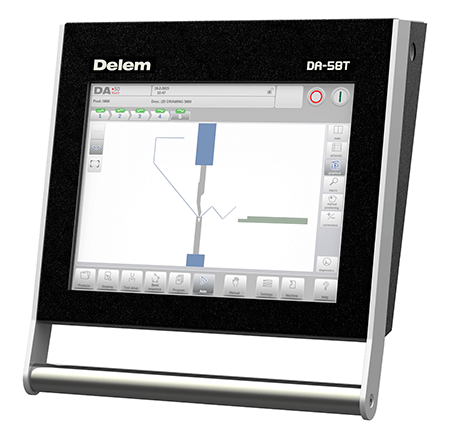
The DA-66T, 69T, 53T, 58T, 41T, and 42T of Delem CNC control systems are touchscreen versions. While DA-66W and 65R CNC control systems are button versions.

(1) Touch Screen Version

Delem has a variety of touchscreen versions of the CNC controller.

DA-40 series

This is a video of the company’s experience using the Delem DA42T control system:

The controller of this series is specially used for traditional torsion shaft press brakes. The system is able to control the back gauge(X&R), and beam(Y).

The bright LCD screen can be used for programming parameters including angle, tool, and material. The DA-42 also has the functions of crowning control and pressure control.

DA-50 series

This is a video of our company’s experience using the Delem DA58T control system:

DA-58T is suitable for the electro-hydraulic synchronous press brake. DA-58T provides 2D touch graphic programming to calculate the bending process and collision detection automatically. The positions of all axes are calculated automatically.

The bending process is simulated by the real scale machine and toolings. DA-58T also can be used for tandem operation. DA-53T is able to control Y1, Y2, and two auxiliary axes.

DA-60 series

This is a video of our company’s experience using the Delem DA69T control system:

The DA-60 series offers 2D and 3D full touch screen graphics programming. The DA-69T and DA-66T are suitable for bending procedures requiring high accuracy. The DA-66T offers 2D programming that includes automatic bend sequence calculation and collision detection. The system is modular, the program is expanded, and the operation is more flexible.

Delem DA66T controller

(2) Button Version

Delem CNC Control System - Button Version
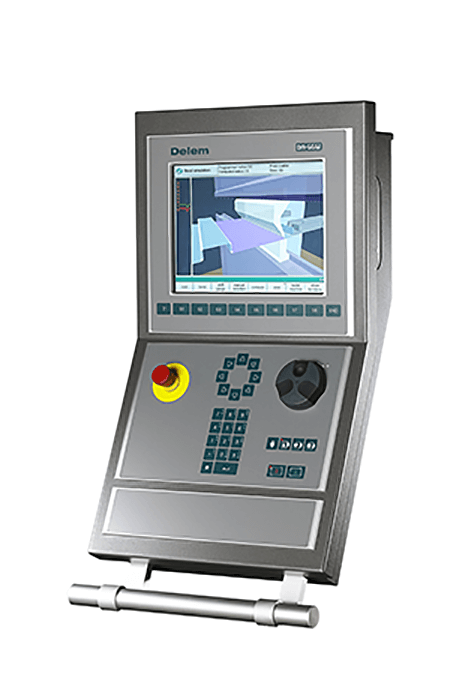
Delem's two common button version controllers are the DA-66W and the DA-65R. These two systems provide 2D graphic programming and 3D graphic display functions. They also offer a multi-machine linkage function, and the touch screen is an optional configuration.

2. ESA CNC Control System

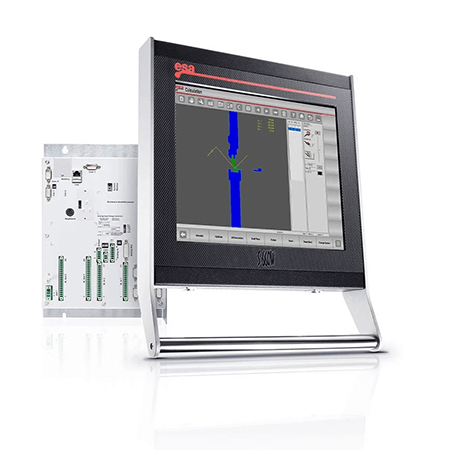
Founded in Italy in 1962, Automation is a world-leading expert in the field of integrated CNC systems. By 2022, ESA's products will mainly include the 600 and 800 series. Commonly used are the S660, S640, S630, S830, S840, S850, etc.

operating ESA controller touch screen

(1) S600 Series

This is a video of our company’s experience using the ESA S640 control system:

The S600 series are all touch screens. They can control a minimum of 3 axes and a maximum of 128 axes. The PLC and HMI can be reprogrammed to meet customized requirements. They can adapt to a variety of bending machines, including hydraulic press brakes, synchronous hydraulic press brakes, electric press brakes, and tandem press brakes, etc.

(2) S800 Series

This is a video of our company’s experience using the ESA S860 control system:

The S800 series is a new product line launched by the company in 2020. The innovation of the S800 series is mainly reflected in intelligent modularization, complete digitalization, and wireless network connection. The screen is 100% full touch, and graphical tools can develop complex 3D interfaces.

3. Cybelec CNC Control System

operate Cybelec controller touch screen

Cybelec, founded in Switzerland in 1970, is a world-famous manufacturer of computer numerical control software for metal forming. Cybelec's CNC system includes button versions: CT8P, CT8PS, CT8PS, CT15P, and the touch screen version: VisiTouch series. The following is a video of our company’s experience using the Cybelec VT19 controller:

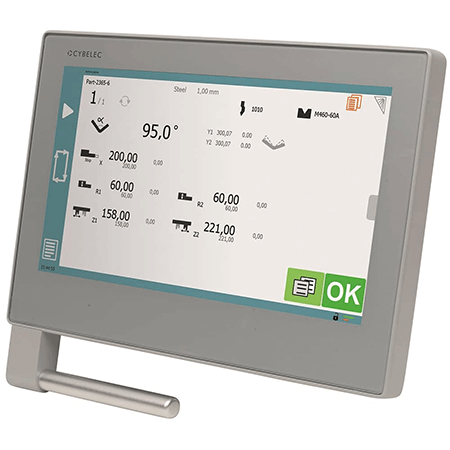
The Cybtouch series is equipped with the Cybtouch tool, which can be used for wireless transmission between PC and system. Modern streamlined glass surface touch screens can be used with gloves.

The touch screen provides 2D or 3D graphics programming, which can be programmed directly. Automatic calculation of bending sequence, angle measurement, and collision detection. It can control multi-axis movement and can be used for tandem press brakes.

IV. Press Brake Controller Comparison

Common brands in the press brake controller market, guide you in selecting the right press brake controller.

Feature/BrandDelem DA-66TESA 630Cybelec VisiTouch 19
Display17" high-resolution color TFT touch screen10" color touch screen19" modern streamlined glass surface touch screen
Programming Mode2D graphical programming, automatic bend sequence calculation, collision detection2D graphical editor and display2D graphical profile drawing, automatic bend sequence calculation
Memory Capacity1 GB128 MB silicon disk32 GB CFAST memory card SATA
Axes SupportedUp to 8+1 axesUp to 5 axesMultiple axes, including complex bending aids and slave axes
Operating SystemEmbedded real-time WindowsNot specifiedWindows 10
User InterfaceIntuitive touch navigation, optimized ergonomicsUser-friendly touch screen interfaceUser-friendly HMI, intuitive programming, dedicated set-up wizards
Offline ProgrammingProfile-TL offline softwareOne offline software license includedInternal backup and restore functions
Safety FeaturesEmergency stop switch, sensor bending & correction interfaceNot specifiedDSP-TX laser safety system, Y1/Y2 auto compensation
PriceHighLowMedium
Ease of UseHigh, intuitive user interfaceMedium, suitable for simple to medium complexity operationsHigh, user-friendly interface, quick setup
CompatibilityDelem Modusys compatibility, USB, peripheral interfacingSuitable for various press brakes including conventional, synchro, hybrid, electric, tandemCompatible with DXF flat pattern and 3D format files
Additional FeaturesFull 3D machine set-up with multiple tool stations, highly effective control algorithmsAdvanced graphic programming, sophisticated algorithms, clear and ergonomic HMIFull 3D visualization and simulation, automatic solutions for complex parts
How to Select Press Brake Controller

1. ESA Control Systems

Advantages:

  • Versatility: ESA's S600 and S800 series feature touch screen controls and can manage configurations from 3 to 128 axes.
  • Programmability: PLC and HMI can be reprogrammed to meet custom requirements.
  • Wide Applicability: Suitable for various types of press brakes, including hydraulic, synchronized hydraulic, electric, and tandem press brakes.
  • Rapid Upgrades: ESA products are frequently updated to keep pace with technological advancements.

Disadvantages:

  • Complexity: Due to its multifunctionality, it may require more time for learning and adaptation.

2. Cybelec Control Systems

Advantages:

  • Excellent Quality: Cybelec products are renowned for their superior quality, providing high-precision bending control.
  • High Reliability: Performs excellently over long-term use with low failure rates.

Disadvantages:

  • Complex Operation: Compared to other brands, Cybelec's interface may be more complex, requiring more training and adaptation time.

3. Delem Control Systems

Advantages:

  • Ease of Use: Delem products are user-friendly and easy to operate, suitable for quick onboarding.
  • Variety of Options: Offers a range of models, including touch screen versions (e.g., DA-66T, 69T, 53T, 58T, 41T, 42T) and button versions (e.g., DA-66W, 65R), catering to different needs.
  • Efficient Programming: Systems like the DA-58T provide 2D touch graphical programming, automatic bending process calculation, and collision detection.

Disadvantages:

  • Higher Cost: Delem products are relatively expensive, which may not be suitable for budget-conscious users.

4. Recommendations

When choosing a press brake controller, consider your specific needs and budget:

  • Limited Budget and Quick Onboarding: Delem control systems are recommended for their ease of use, though their higher cost should be considered.
  • High Quality and Precision: Cybelec is a great choice, despite its more complex operation, its superior quality and reliability are worth the investment.
  • Multifunctionality and Customization: ESA control systems are the best choice, especially for scenarios requiring multi-axis control and customization.

V. Controller Features

Programming Capabilities

Advanced Programming Options

Modern controllers enable precise and repeatable bends with complex sequences. Visual programming interfaces and simulation tools assist operators in designing and adjusting bending processes easily. Features include:

  • Graphical Programming Interfaces and 2D/3D Simulation: Provide a visual representation of the bending process, simplifying the design and adjustment of bending sequences.
  • Offline Programming: Enables the creation and adjustment of bending programs without interrupting ongoing production, optimizing workflow and productivity.

User Interface

Touchscreen Controls

A user-friendly interface is critical for efficient operation. Modern controllers typically feature intuitive touchscreens that simplify navigation and parameter input. Key aspects to look for include:

  • Large, High-Resolution, Multi-Touch Displays: Make navigation and parameter input straightforward and intuitive.
  • Customizable Layouts: Enable operators to tailor the interface to their preferences, enhancing usability and efficiency.

Safety Features

Essential Safety Mechanisms

Safety is paramount in metal fabrication, and press brake controllers come equipped with various safety features to protect operators and machinery. Important safety mechanisms include:

  • Emergency Stop Buttons: Easily accessible buttons that immediately halt machine operations in emergencies.
  • Light Curtains: Infrared barriers that stop the machine if an object or person enters the danger zone.
  • Safety Interlocks: Ensure that all safety gates and doors are securely closed before the machine can operate, preventing accidental starts.

Tooling Compatibility

Integration with Tooling Systems

Compatibility with various tooling systems is crucial for efficient production. Controllers should offer features that facilitate seamless integration and management of tools, such as:

  • Tooling Libraries: Preloaded databases of common tools that simplify setup and ensure the correct tools are used for each task.
  • Automatic Tool Identification: Recognizes and configures tools automatically, reducing setup time and minimizing errors.
  • Tool Compensation: Adjusts for wear, ensuring consistent quality.

Advanced Features

Enhancements for Precision and Efficiency

Advanced press brake controllers often include additional features that enhance precision, safety, and overall productivity. Notable features include:

  • Automatic Tool Compensation: Adjusts for tool wear and variations, ensuring consistent bending results.
  • Collision Detection: Prevents accidents by identifying potential component clashes.
  • Data Logging: Records machine performance, tool wear, and production metrics, providing valuable insights for maintenance and optimization.
Enhancements for Precision and Efficiency

Connectivity and Integration

Networking Capabilities

Modern controllers often include connectivity features that allow them to integrate with other systems and devices. Key connectivity options include:

  • Ethernet and Wireless Connectivity: Enable easy data transfer and remote monitoring, enhancing control and flexibility.
  • Integration with ERP Systems: Facilitates seamless communication between the press brake and enterprise resource planning systems, streamlining production management.

Ⅵ. The Needs-First Selection Method – Four Steps to Pinpoint the Controller That Fits You Best

If Chapter One gave you the right “worldview,” this chapter provides a precise “methodology.” When it comes to selecting a controller, the biggest pitfall is drowning in an ocean of technical specifications and letting sales pitches lead the way. Successful selection is not a battle of feature comparisons—it’s an inside-out process of decoding your actual needs.

This “needs-first selection method” completely overturns the traditional approach of “look at products first, then match needs.” Here, we guide you through a comprehensive review—from your shop floor to your financial statements—so the most suitable controller model naturally reveals itself. This is no longer guesswork in the fog; it’s a GPS-guided decision.

6.1 Step One: Map Your Production Profile (Current State and 3-Year Outlook)

Every selection process starts with your unique production DNA. A vague profile will inevitably lead to a poor investment. Before touching any product brochures, become the best analyst of your own factory. Your profile should capture not only the current situation but also a realistic forecast of your next three years of business growth.

  • Workpiece Complexity Analysis: What “difficulty level” do your products fall into?
    • Simple Level: Workpieces mostly have straight edges, few bends (usually fewer than 5), regular geometric shapes, and stable material/thickness. Examples: standard stiffeners, mounting brackets, simple flat panels.
    • Medium Level: Workpieces feature multiple steps, non-90° angles, curved transitions, or localized clearance needs, requiring careful bend sequence planning. Examples: standard enclosures, equipment casings, complex box structures.
    • Complex Level: Workpieces with asymmetrical features, tapered edges, large thin sheets prone to sagging, or extremely tight assembly tolerances, requiring multiple stations in a single setup. Examples: custom decorative parts, precision instrument components, long stainless steel doors.
  • Material and Batch Evaluation: Is your production rhythm a “marathon” or a “sprint”?
    • Material Spectrum: List the key materials you process (e.g., Q235, 304 stainless steel, 5052 aluminum) along with thickness range (thinnest to thickest) and maximum work length. Material springback characteristics are a major challenge for controller algorithms.
    • Batch Structure: Do you operate in large batches of few product types, or in high-mix/low-volume (HMLV) mode? The latter means frequent daily die changes, with programming and setup efficiency requirements several times higher than the former.
  • Operator Skill Level: Does your “software” match your “hardware”?
    • Team Experience: Is your team made up of seasoned veterans or mostly newcomers? An intuitive, graphical interface can dramatically shorten training time for new hires and reduce reliance on “masters.”
    • Quality Standards: What are your expectations for first-piece pass rate and batch consistency? Do you require strict angle tolerance control and production data traceability? This determines whether advanced functions like angle measurement and automatic compensation are necessary.

[Downloadable Tool] Production Audit Checklist

To make your profile sharper, we’ve designed a checklist tool. Before engaging any supplier, complete it together with your production, technical, and sales teams. This checklist will be your most powerful “selection compass.”

Audit DimensionKey QuestionYour Answer
Workpiece ProfileAverage bends per piece? 
 Percentage of complex-level workpieces? (%) 
 Any tapered/asymmetrical pieces? 
Production ProfileMain materials and thickness range? 
 Daily die change count? 
 Typical order batch size? 
Operations ProfileTolerance for first-piece setup time? (minutes) 
 Dependence on operator skill? (High/Medium/Low) 
 Plan for automation integration (e.g., robotics) within 3 years? 
Priority Ranking(Please rank) Efficiency, Precision, Flexibility, Automation Potential, Low Cost 

6.2 Step Two: Match Axis Configuration to Workpiece Complexity

Once you have a clear production profile, matching axis configurations shifts from a complex guessing game to a straightforward connection exercise. Remember the golden rule: Configure for 80% of your current work, reserve capacity for the remaining 20% future needs.

  • 2+1 / 3+1 Axes: The economical choice for simple profiles and brackets
    • Configuration: Y1/Y2 (ram) + X (backgauge front/rear) + V (hydraulic crowning).
    • Best Fit: Your production profile is dominated by “simple-level” workpieces. You value stability, reliability, and low-cost repeat production. This is the “entry-level SUV” of bending needs.
  • 4+1 / 6+1 Axes: The all-rounder for most sheet metal workshops
    • Configuration: Adds R-axis (backgauge vertical movement) or Z1/Z2 axes (backgauge lateral movement) to the 3+1 base.
    • Best Fit: You handle a large share of “medium-level” workpieces, often dealing with stepped parts (requiring R-axis) or aiming for efficiency by completing multiple bends in one setup and processing asymmetrical parts (requiring Z1/Z2 axes). This is the “city SUV” with the widest applicability and highest ROI.
  • 8+1 Axes and Beyond: Essential for complex parts, automation cells, and special applications
    • Configuration: Builds on 6+1 axes with X-Prime/Delta-X (backgauge differential movement), sheet followers, and other auxiliary axes.
    • Best Fit: “Complex-level” workpieces form the profit core of your business, tapered parts are routine, or you are planning robotic bending cells. This setup is the “rugged off-road vehicle” ready for any challenge.

[Decision Tool] Axis Configuration Decision Flowchart

Basic Check: Is your workpiece longer than 2.5 meters or made from high-strength steel/stainless steel?

  • Yes -> Crowning axis is a must-have—it’s the foundation of precision.

Clearance Needs: Does your workpiece have steps requiring the backgauge fingers to move up/down to avoid formed edges during bending?

  • Yes -> You need at least an R-axis, upgrade to 4+1 axes.

Efficiency & Asymmetry: Do you want to complete bends of different depths in one setup, or process asymmetrical parts?

  • Yes -> You need Z1/Z2 axes, upgrade to 6+1 axes.

Tapered Part Processing: Does your product line include tapered parts (different depths at each end)?

  • Yes → You’ll need the X-Prime/Delta-X axis, the most efficient solution available.

6.3 Step Three: Translating Operational Goals into Essential Functional Requirements

The number of axes defines the machine’s physical limits, while the controller’s software capabilities determine its level of intelligence. In this step, you’ll precisely convert the operational goals prioritized in your audit checklist into the must-have controller functionalities.

  • Goal: Cut changeover and programming time by 50%
    • Key Functions: Offline programming software (complete all programs in the office—zero machine downtime), 3D graphical programming (import STEP/DXF files directly to auto-generate programs), smart tooling library (system automatically recommends tools and shows installation positions).
  • Goal: Reduce scrap rate to below 1%, achieving “first-piece pass” quality
    • Key Functions: 3D bending simulation and collision detection (pre-run the entire process virtually to eliminate interference), advanced material springback compensation database (automatically predicts and corrects angles based on material properties), integrated angle measurement system (real-time angle measurement with closed-loop feedback to remove batch variation).
  • Goal: Increase Overall Equipment Effectiveness (OEE) by 20%
    • Key Functions: Automatic bend sequence optimization (system calculates the fastest path with minimal flipping), parallel processing of multiple steps (while current bending is in progress, the backgauge auto-prepositions for the next step), fast program search and recall (retrieve programs quickly via barcode scan or keyword search).

6.4 Step Four: Looking Beyond Purchase Price—Evaluating Total Cost of Ownership (TCO)

The smartest buyers never focus solely on the price tag. A seemingly inexpensive controller can become a bottomless pit of hidden costs later. Total Cost of Ownership (TCO) is the only rational benchmark for your final decision.

  • Initial Investment (The visible iceberg)
    • Hardware costs: Controller unit, touchscreen, operating panel.
    • Software licensing: Base software, offline programming software, advanced features (e.g., 3D file import) licensing fees.
  • Hidden Costs (The submerged mass of ice)
    • Training costs: A poorly designed interface can extend training cycles by weeks and increase new hire turnover.
    • Maintenance and service: The supplier’s service network coverage, response speed, and spare part availability directly determine downtime. A single day of downtime can cost more than an entire year’s service contract.
    • Productivity loss: A slow, crash-prone controller silently consumes valuable working hours and erodes profits every day.
  • Future Costs (The horizon ahead)
    • Software upgrades: Is there a clear upgrade path? Are costs free, one-time, or subscription-based?
    • Feature expansion: If you plan to add an axis or integrate a robot later, what will expansion cost? Are interfaces open?

[Decision Tool] Quick ROI Calculation

When comparing two controllers (A as the basic version, B as the high-efficiency version, price difference = ΔP), try answering:

With offline programming and auto-optimization, how much programming and debugging time (ΔT) can controller B save me each day? How much scrap (ΔM) can it reduce?

Annual savings (S) ≈ (ΔT × daily working hours × working days × labor cost) + (ΔM × annual output × material cost)

Payback period (months) = ΔP / (S / 12)

If the payback period is under 18 months, opting for the more efficient controller is almost a no-brainer. This simple formula gives you solid, data-backed confidence when weighing price differences.

High-Efficiency Controller: Worth the Investment?

Ⅶ. Real-World Case Studies—Selection Insights for Three Typical Scenarios

The ultimate value of theory lies in guiding practice. If the previous chapters built your “knowledge framework” for selection, this chapter is the “live-fire range” to test it. We’ll dive into three real scenarios representing the most common challenges in sheet metal processing, dissecting the decision-making logic behind each. You’ll see that the smartest choice is rarely the “best” controller, but the one that’s the most perfectly matched to your needs.

7.1 Case One: A Small Job Shop with High Mix, Low Volume

  • Company Profile: A classic job shop with three press brakes and 15 employees. Its survival depends on responding quickly to a constant stream of small orders. Products change daily, ranging from simple mounting brackets to moderately complex equipment enclosures.
  • Core Challenge: Profits are being devoured by excessive “setup time.” Operators spend most of their energy interpreting drawings, writing new programs, hunting for the right tools, and repeatedly test-bending parts. Actual bending time (machine utilization) is low, leading to tight deadlines and an inability to accept more complex, higher-margin jobs.
  • Selection Strategy & Solution:
    • Configuration: Chose the most versatile 4+1 axis setup (Y1/Y2, X, R + hydraulic crowning) for the new equipment.
    • Controller: Between a top-tier 3D controller and a mainstream 2D graphical controller, they wisely chose the latter—ESA S640.
    • Decision Logic: They recognized that their bottleneck wasn’t bending speed, but the time it takes to switch from finishing part A to starting part B. The ESA S640’s 2D graphical touchscreen interface lets experienced operators sketch part profiles directly at the machine—like drawing on a tablet—or import DXF files. The system automatically calculates the optimal bending sequence and backgauge positions within seconds, then clearly displays tooling setup in graphical form. This workflow frees operators from tedious calculations, allowing them to focus on swift execution.
  • Results & Benefits:
    • Average changeover and first-piece setup times dropped from 25–30 minutes to under 10 minutes, boosting efficiency by over 60%.
    • Significant increase in productive machine time enabled the shop to handle 20% more orders without adding new equipment.
    • Lower operator frustration, higher job satisfaction, and improved team stability.
  • Expert Insight: In this kind of scenario, the biggest misconception is over-reliance on “offline programming.” For parts that aren’t extremely complex, a smooth “shop-floor programming” system is often far more agile than the “office engineer programming → network transfer to workshop” model. Real wisdom is equipping your frontline operators—the core of your productivity—with the sharpest Swiss Army knife, not a set of surgical tools buried under layers of approval.

7.2 Case Two: Automotive Component Manufacturer Pursuing Absolute Consistency

  • Company Profile: A Tier-2 supplier producing chassis structural components for top automotive brands. Its production lines operate 24/7, with annual output for a single part reaching into the millions.
  • Core Challenge: Process capability reigns supreme. The customer requires that critical dimensional CpK (process capability index) remain consistently above 1.67 — meaning an extremely narrow margin for deviation. Any variation in quality could trigger mass rejections or catastrophic supply chain disruptions. In addition, all production data must be fully traceable and seamlessly integrated into the factory’s MES (Manufacturing Execution System).
  • Selection Insight & Solution:
    • Configuration: The setup features a fully equipped 8+1-axis press brake, integrated with robotic loading/unloading systems and real-time laser angle measurement.
    • Controller: The company opted decisively for the industry’s benchmark — the Delem DA-69T, supported by a complete suite of offline programming and simulation software.
    • Decision Logic: The focus here shifts from “flexibility” to absolute control and seamless data connectivity. The Delem DA-69T serves as the “command center” of the entire automated cell. Engineers use the offline 3D simulation tools to program every millisecond of the process — from robotic gripping and positioning to bending and stacking — eliminating any potential interference before production begins. Once deployed, the DA-69T not only drives all axes with precision but also receives live feedback from the laser angle system, executing micron-level closed-loop corrections to cancel out springback variations caused by material batch differences.
  • Results & ROI:
    • The production process achieved high automation and outstanding stability, with CpK consistently maintained above 1.8, exceeding customer expectations and earning “no inspection required” supplier status.
    • Through seamless MES integration, every part now has a complete “lifecycle record” traceable from raw steel sheet to finished component.
    • The automated cell operates in “lights-out” mode, dramatically reducing labor costs and eliminating quality risks associated with human intervention.
  • Expert Insight: Many assume the true value of a high-end 3D controller lies in its attractive graphical interface. In reality, for large-scale, precision-driven manufacturing, its true essence is an ultra-fast, highly reliable data processing and communication platform. It’s not merely “playing” a preset program—it’s orchestrating a sophisticated performance in which machine tools, robots, sensors, and databases all act in perfect synchronization, ensuring every “performer” executes every move flawlessly.

7.3 Case Study 3: Custom Metal Fabricator Working with Expensive Materials

  • Company Profile: A specialized manufacturer serving the aerospace and precision medical equipment sectors. They process premium materials such as titanium plates, high-strength stainless steel, and mirror-finish aluminum sheets—each piece a unique, non-standard component.
  • Core Challenge: “First-piece qualification” is a matter of survival. Trial-and-error bending is strictly forbidden—each mistake could mean tens of thousands in material loss, erasing project profits instantly. With every workpiece being one-of-a-kind, there’s no prior data to rely on.
  • Selection Insight & Solution:
    • Configuration: A high-rigidity, large-tonnage press brake was selected to suit the product range. Axis count was configured as needed, but high-precision dynamic hydraulic crowning was deemed essential.
    • Controller: They chose the Cybelec ModEva RA, renowned for its powerful algorithms and open customization capabilities.
    • Decision Logic: Success in this field depends 90% on the controller’s algorithmic intelligence—its ability to predict and compensate accurately. The Cybelec system excels through its deep understanding of metal springback behavior and its sophisticated compensation models. Its high-fidelity 3D simulation allows engineers to preview every step of complex bends from any angle, preventing even the smallest collisions during workpiece rotation. Just as importantly, its open material database lets manufacturers embed their proprietary process data to fine-tune control parameters for specific alloys.
  • Results & ROI:
    • With high-accuracy offline simulation and adaptive springback algorithms, the first-pass yield rose above 95%.
    • Material waste from failed trial bends was almost completely eliminated, safeguarding profit margins.
    • The company established a strong technological moat in the high-end custom manufacturing market, earning deep client trust.
Results & ROI
  • Expert Insight: The masterstroke here lies in tapping the controller’s learning and calibration capabilities. Before working on costly materials, experienced engineers test a small “sample sheet” from the same batch, performing one or two simple 90° bends. The controller records real-world springback data, which is then used to instantly recalibrate its internal material model. This seemingly minor step effectively gives the controller a “final study session” before the big exam—an act of craftsmanship that makes “first-piece qualification” possible.

Ⅷ. Avoiding Buyer Pitfalls — Five Common and Costly Selection Mistakes

By now, you’ve mastered the full selection framework—from foundational cognition and needs decoding, to brand evaluation and future scalability. Before signing that purchase contract, this chapter serves as your risk checklist, uncovering five of the most hidden, widespread, and financially damaging pitfalls in controller selection. Avoid them, and your investment will stand rock-solid.

8.1 Pitfall #1: Feature Overload — Paying for Functions You’ll Never Use

This is one of the most common psychological traps in procurement. Confronted with a features comparison chart, buyers instinctively gravitate toward the option with the most checkmarks, assuming more features mean higher quality and better value. Sales reps are happy to dazzle with 3D graphics and sophisticated algorithms to showcase superiority. Yet the harsh industry reality is that, throughout a controller’s life cycle, less than 30% of its available functions are used regularly. The other 70% remain dormant—like the “off-road mode” button in a luxury car that you’ll never press, even though you paid for it.

  • [Unique Insight #3]: Drop the “feature checklist” mindset and focus instead on the core functions that accelerate your workflow speed.
    • Shift in Thinking: Stop asking, “Does it have this feature?” and start asking a far more revealing question: “How many steps — and how much time — does it take to program one of our typical parts using your system?
  • Field Test: During the final evaluation stage, be sure to bring a real drawing from your factory—say, a typical chassis part with five bends—and ask the supplier to run a live demonstration. Observe the entire workflow, from importing the drawing to generating an executable program. Is it a smooth five-click experience, or a tedious maze requiring the setup of 30 parameters? Can it be done effortlessly in three minutes, or does it take 15 minutes of repeated tweaking? This firsthand impression of “workflow speed” is far more valuable than any isolated feature. Remember, you are ultimately paying for “efficiency,” not for the “number of functions.”

8.2 Pitfall #2: Saving Too Much Now—“Neglecting the Path to Future Automation Upgrades”

Trying to save a few thousand—or even tens of thousands—upfront by choosing a cheap yet inflexible “closed” controller is one of the most strategically dangerous short-sighted decisions you can make. It’s like buying a small plot of land you can never expand: two years later, when your production grows and you want to integrate robots or connect to your factory’s MES system, you might discover that your controller lacks the required communication protocols or has already maxed out its I/O (input/output) capacity. At that point, you face a painful dilemma—either spend a fortune on heavy reengineering or scrap a still fully functional machine prematurely.

  • Warning Signs:
    • The controller supports only proprietary, non-mainstream communication protocols and avoids mentioning industry standards like EtherCAT or PROFINET.
    • I/O point allocations are “just enough,” leaving no room for future sensors, safety light curtains, or actuators.
    • When asked about examples of robot integration, the supplier gives vague answers and cannot produce clear technical documentation or customer references.
    • A more advanced test is to ask: “If I want to call specific controller functions externally (for example, to read real-time angle data), do you provide an API or a developer toolkit?” A truly “open” system is architected for seamless integration, while a closed one will have no idea what you’re talking about.
Warning Signs of a Closed Controller

8.3 Pitfall #3: Ignoring the Human Factor—“Powerful Features Are Worthless If Operators Can’t Use Them”

This is the human trap. You may invest heavily in a flagship controller boasting advanced 3D simulation and springback algorithms, but your operators are seasoned machinists accustomed to entering simple parameters. In practice, they often avoid the new features—finding them intimidating or confusing—and fall back on basic manual methods. As a result, your sophisticated, “PhD-level” controller gets reduced to performing “middle-school” tasks, squandering your investment and potential productivity gains.

  • Solution: During the final decision phase, ensure your core front-line operators are actively involved. Let them test the shortlisted controllers by programming a part they handle regularly. A comment like “This interface feels intuitive and logical,” or “This function is buried and confusing,” speaks louder than any glossy brochure. Remember, powerful features must align with your team’s skill level and willingness to adapt. Otherwise, the technology becomes a bottleneck—not a productivity boost.

8.4 Pitfall #4: Underestimating After-Sales Support—“A Single Day of Downtime Can Cost More Than a Year of Service Fees”

When comparing quotes, the after-sales service contract is often seen as a cost-cutting “add-on.” However, if your equipment suddenly stops with an alarm right before delivery—and no one picks up the supplier’s support line—you’ll experience firsthand how costly downtime can be.

  • Quantify the Risk: Take one minute to calculate your downtime cost: (Hourly production value + idle labor cost) × estimated downtime hours. You’ll likely find that an eight-hour stoppage can cause direct and indirect losses exceeding an entire year’s service contract fee.
  • Do Your Homework: When choosing a supplier, don’t fixate solely on price—investigate their service capabilities as if you were a detective:
    • Do you have resident service engineers in our city or region, and where is your nearest spare-parts warehouse?
    • What is the promised response time in the contract? (Is it phone support within 4 hours or an on-site technician within 24 hours?)
    • What’s the inventory status of critical spare parts like CPU boards, touchscreens, and servo drives? Will replacements need to be shipped from overseas?

8.5 Pitfall #5: Overlooking Ecosystem Compatibility—“When Your Controller Becomes a Data Island”

You choose Controller Brand A for its stellar performance, while your engineering team designs exclusively in CAD/CAM Software Brand B. Both claim DXF file compatibility—yet mold libraries, material databases, and key process parameters don’t communicate. Engineers complete meticulous designs in the software, only for operators to re-enter all process parameters manually at the controller. The result? Data silos, inefficiency, and a fertile ground for errors.

  • [Unique Insight #4]: Perform an “Ecosystem Check” to Ensure Seamless Collaboration Between Controller and Software Infrastructure
    • Go Beyond File Compatibility: True compatibility means seamless, bidirectional data flow—not just the ability to “open the same file.”
    • Ask Deeper Questions: You should ask your supplier, “Can your offline programming software directly read the material properties and thickness already defined in our SolidWorks/Inventor models?” “Can it synchronize data with our third-party tool management system?” “From importing a 3D CAD model to generating machine-ready code with all process parameters—like tonnage and springback compensation—is the workflow fully automated, or does it require significant manual input?”
    • The Ultimate Goal: Your objective is to build a seamless “Digital Thread” connecting design to manufacturing, with the controller serving as a vital execution node. Before purchasing, confirm that it integrates smoothly within your existing software ecosystem—so it becomes part of a unified data flow, not an isolated system requiring constant translation.

Ⅸ. FAQs

1. How do material type and thickness affect the selection of a press brake controller?

Material type and thickness are crucial in selecting a press brake controller, influencing bending force and precision. Different materials have varying bending properties. Thicker materials need higher tonnage and powerful controllers.

CNC controllers offer flexibility and precision. Ensuring controller compatibility with tooling and having safety features is vital. In summary, material type and thickness ensure the controller's power, precision, and safety for accurate bending.

2. What are the golden rules of press brake operation?

Wear personal protective equipment, such as gloves and goggles. Never wear loose clothing, wristwatches, and rings when operating machinery to avoid being dragged into a dangerous area. Never leave the machine running unattended. Keep hands away from all moving items, such as the ram.

3. What is the difference between manual and CNC press brake controllers?

Manual controllers require operator adjustments and knowledge, leading to potential errors. CNC controllers use software for precise programming, enhancing precision and efficiency, but are more expensive and require training.

Ⅹ. Conclusion

Modern press brake machines are equipped with advanced controllers, and different brands and models of press brake controllers may have their superiority. Before selecting the advanced press brake controller, it is necessary to thoroughly understand its function and brand and then select the appropriate controller according to the budget.

cnc press brake

The most important points in choosing a controller for a press brake are functionality, stability, ease of use, and safety. User-friendly controllers can provide you with efficient working time and outstanding levels of productivity and performance. High-quality controllers are designed to ensure bending accuracy. 

In my article, I discuss three advanced press brake controller brands that can give you the very best user experience. ESA rapidly upgrades its wide range of products and functions. Delem's products are easy to operate, but they tend to be more expensive. Cybelec's products are of excellent quality, although the operation can be slightly complicated. Upgrading the press brake CNC controller can improve performance and reduce costs.

ADH Machine Tool is a professional sheet metal enterprise in the world of press brake manufacturers. If you need to purchase a satisfying press brake, why not contact our product experts and customize the product according to your specific needs?

How to Select Press Brake Controller infographic

Download the Infographic With High Resolution

Looking for Machines?

If you're looking for sheet metal fabrication machines, then you've come to the right place!

Our Customers

The following big brands are using our machines.
Contact Us
Not sure which machine is right for your sheet metal product? Let our knowledgeable sales team guide you in selecting the most suitable solution for your needs.
Ask An Expert
Privacy PolicyTerms
Copyright © 2026
linkedin facebook pinterest youtube rss twitter instagram facebook-blank rss-blank linkedin-blank pinterest youtube twitter instagram